
TL;DR:
- A restaurant group's shared services setup consolidates back-office functions to reduce costs and improve data accuracy. Successful implementation relies on a standardized chart of accounts, process standardization, and strong governance before automation. The optimal model depends on the group's size, with outsourced solutions for smaller groups and fully centralized in-house systems for larger ones.
A restaurant group shared services setup consolidates back-office functions like accounting, payroll, and procurement across multiple units into a single operating structure, cutting costs and producing cleaner financial data. The industry term for this model is a Shared Services Center, or SSC. For multi-unit operators in the United States, the SSC model is the most direct path to real-time P&L visibility, tighter prime cost control, and scalable growth without proportional overhead increases. This guide covers the prerequisites, step-by-step implementation, common pitfalls, and model comparisons you need to make it work.
What does a restaurant group shared services setup require?
The foundation of any SSC is a standardized chart of accounts, or COA. Without it, every location speaks a different financial language, and consolidation becomes a manual nightmare. Building and validating a COA with location hierarchy typically takes 2–3 weeks for a 20-location group. That timeline includes integrating POS data, payroll codes, and intercompany clearing accounts inside platforms like Restaurant365.

Before you touch any automation tool, your processes must be standardized. Automating before standardizing only automates chaos and reduces the potential benefits of the entire SSC investment. That means documented workflows for invoice approval, labor scheduling, and vendor payments must exist at every unit before any software goes live.
The core technology stack for a functional SSC typically includes:
- POS system (Toast, Lightspeed, or Aloha) configured identically across all units
- Accounting platform (Restaurant365 or QuickBooks Enterprise with multi-location modules)
- Payroll integration (ADP, Paylocity, or HotSchedules Workforce)
- Workflow automation (Ottimate or Plate IQ for AP automation)
- Reporting layer (real-time dashboards tied to your accounting platform)
Governance matters as much as technology. Effective shared services require multi-tier governance involving senior leadership and operational teams to maintain alignment and compliance. Assign a shared services director, define escalation paths, and establish a service-level agreement for each function before launch.
Pro Tip: Map every existing process at your highest-volume location first. That unit's workflows become the template. Trying to build a universal process from scratch wastes weeks.
How do you implement a shared services center step by step?
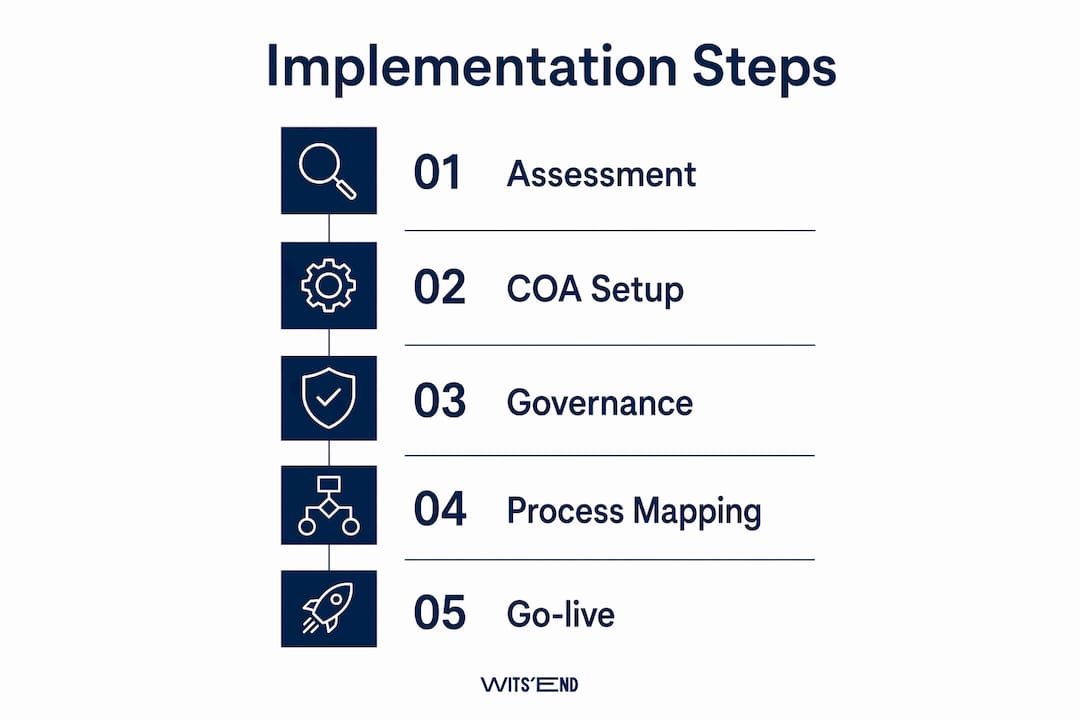
A disciplined sequence separates SSC projects that deliver ROI from those that stall in integration hell. Follow these six steps in order.
-
Assess current state. Audit every location's accounting codes, vendor lists, POS configurations, and payroll structures. Document variances. This due diligence phase typically runs two to four weeks and surfaces the gaps that will cause problems later.
-
Design the operating model. Decide which functions move to the SSC (AP, AR, payroll, reporting) and which stay local (cash handling, scheduling adjustments). Define the governance structure and assign ownership for each service line.
-
Build the standardized COA and location hierarchy. In Restaurant365, this means creating a location hierarchy that mirrors your legal entity structure, with dedicated clearing accounts for intercompany transactions. A clean COA is the single most important technical decision in the entire project.
-
Integrate POS, payroll, and vendor systems. Data alignment for systems integration is consistently underestimated. Expect several weeks for clean POS, payroll, and vendor data to sync without errors. Build that buffer into your project plan.
-
Deploy AI-driven automation. Once data is clean and processes are standardized, introduce agentic AI tools for multi-step reconciliations, invoice matching, and variance flagging. The primary value of agentic AI in shared services is elevated data quality and precise operational insights, not just headcount reduction.
-
Validate and launch with live dashboards. Run parallel processing for two to four weeks before full cutover. Confirm that dashboards reflect real-time prime costs, labor percentages, and food cost variances at both the unit and consolidated level.
The table below shows realistic timelines for each phase based on a 10–20 location group.
| Phase | Activity | Estimated Duration |
|---|---|---|
| Assessment | Process audit and gap analysis | 2–4 weeks |
| COA Build | Chart of accounts and hierarchy setup | 2–3 weeks |
| Integration | POS, payroll, and vendor data sync | 3–5 weeks |
| Automation | AI workflow deployment | 2–3 weeks |
| Validation | Parallel processing and dashboard QA | 2–4 weeks |
Back-office accounting SSC implementation can be completed in as few as three weeks after engagement finalization when the COA and data are already clean. That speed is only achievable if prerequisites are fully in place before the clock starts.
Pro Tip: Set up a dedicated intercompany clearing account from day one. Skipping this step creates reconciliation errors that compound every period and take far longer to unwind than to prevent.
What are the most common pitfalls in shared services setup?
Most SSC projects that underdeliver share the same set of avoidable mistakes.
-
Rushing the COA design. Operators who copy a generic chart of accounts from a template end up with codes that don't match their POS items, their legal entities, or their reporting needs. Rebuilding a COA mid-project costs two to three times more time than building it correctly upfront.
-
Underestimating data alignment delays. Clean data does not migrate automatically. Vendor names, account codes, and payroll categories arrive from source systems in inconsistent formats. Budget for a dedicated data cleanup sprint before integration begins.
-
Automating fragmented processes. This deserves repeating because it is the most expensive mistake in SSC projects. If your invoice approval process varies by location, automating it locks in the inconsistency at scale.
-
Neglecting change management. General managers and unit controllers often perceive the SSC as a threat to their autonomy. Without structured communication and training, adoption stalls and workarounds proliferate.
-
Building reports that are too granular or too broad. Tracking prime costs below 60% requires real-time operational data, not monthly closes. Design your reporting layer to surface the metrics that drive daily decisions, not just period-end summaries.
The operators who struggle most with shared services setup are not the ones with the most locations. They are the ones who treated the COA as an afterthought and the governance structure as optional.
Centralized vs. hybrid vs. outsourced: which model fits your group?
The right shared services configuration depends on your group's size, technical capacity, and growth trajectory. The table below compares the three primary models.
| Model | Best For | Cost Profile | Control Level | Implementation Speed |
|---|---|---|---|---|
| Centralized (in-house) | Groups with 15+ locations and internal finance staff | Higher upfront, lower ongoing | Full | 8–16 weeks |
| Hybrid | Growing groups (5–15 locations) with mixed capacity | Moderate | Shared | 6–12 weeks |
| Outsourced SSC | Groups under 10 locations or those lacking internal bandwidth | Lower upfront, predictable monthly | Lower | 3–6 weeks |
Outsourced shared services deliver financial statements within 10–15 days after period end. That speed gives operators a meaningful window to adjust pricing, labor, or purchasing before the next period compounds the problem.
Standardizing procurement and service contracts across a multi-unit network yields volume discounts of 12%–22% below MSRP. That figure applies regardless of which SSC model you choose, as long as purchasing is centralized. Centralized vendor and POS standardization also reduces food cost variance to within plus or minus one percentage point and cuts new hire training time by 60%.
The hybrid model suits most growing groups in the 5–15 location range. It keeps financial oversight in-house while outsourcing transactional functions like AP processing and payroll. As the group scales past 15 units, migrating to a fully centralized in-house SSC typically becomes cost-effective. Real-time data dashboards tied to a centralized SSC give network directors the visibility to cut operating costs by more than 20%, a figure that justifies the internal investment at scale.
Key takeaways
A restaurant group shared services setup delivers its full value only when the chart of accounts, governance structure, and process standardization are in place before any automation or integration begins.
| Point | Details |
|---|---|
| COA is the foundation | Build and validate your chart of accounts with location hierarchy before touching any integration. |
| Standardize before automating | Document and align all unit-level processes first; automation applied to inconsistent workflows compounds errors. |
| Match the model to your scale | Outsourced SSCs suit groups under 10 locations; centralized in-house models pay off at 15 or more units. |
| Real-time data drives decisions | Monthly financial closes are too slow; live dashboards tied to your SSC reduce operating costs measurably. |
| Governance is non-negotiable | Assign a shared services director and define service-level agreements before launch to prevent adoption failures. |
The part most operators get wrong
I have worked with restaurant groups that spent six figures on Restaurant365 licenses and AP automation tools, then wondered why their period-end close still took three weeks and their food cost reports were still unreliable. Every time, the root cause was the same: they built the technology on top of a broken COA and skipped the governance conversation entirely.
The COA is not a finance department problem. It is an operations problem. When a line cook rings in a menu item under the wrong category because the POS was mapped incorrectly, that error travels through every report, every period, and every consolidation. Fixing it retroactively is painful. Preventing it costs a few extra weeks at the start.
My honest recommendation is to start with your weakest operational pillar, whether that is cost control, onboarding, or vendor management, and fix that first. The biggest gains in shared services come from addressing the function that is most broken, not the one that is easiest to automate. Use agentic AI to raise the quality of your data and the speed of your reconciliations. Do not use it to paper over process gaps that should have been fixed in week one.
The groups that get this right treat their SSC as a living operating system, not a one-time IT project. They monitor it through real-time financial reporting, adjust governance as they scale, and revisit their COA every time they add a new concept or legal entity. That discipline is what separates the operators who grow profitably from the ones who grow and wonder where the margin went.
— Chris
How wits' end solutions supports multi-unit operators
Wits' End Solutions works with restaurant and hotel groups across the United States to design and implement shared services structures that hold up under real operating conditions. Our team has built COAs inside Restaurant365, managed AP automation rollouts, and stood up task force consulting engagements for groups ranging from three locations to thirty. We do not recommend tools we have not used ourselves, and we do not hand you a playbook and walk away. If your group is ready to consolidate back-office functions, reduce period-end close times, and get financial data you can actually act on, connect with us. Explore our deep analytics and advisory services or visit Wits' End Solutions to start the conversation.
FAQ
What is a restaurant group shared services setup?
A restaurant group shared services setup, formally called a Shared Services Center, consolidates back-office functions like accounting, payroll, and procurement across multiple units into one operating structure. The goal is cleaner financial data, lower overhead, and faster reporting.
How long does it take to set up shared services for a restaurant group?
Implementation timelines range from 3 weeks for outsourced back-office accounting to 16 weeks for a fully centralized in-house model. The COA build alone takes 2–3 weeks for a 20-location group when done correctly.
What technology platforms are used in restaurant shared services?
Restaurant365 is the most widely used accounting platform for multi-unit SSC setups, typically paired with a POS system like Toast or Aloha, a payroll tool like ADP or Paylocity, and AP automation software like Ottimate or Plate IQ.
Should i outsource or build an in-house shared services center?
Groups under 10 locations typically benefit most from outsourced shared services, which deliver financial statements within 10–15 days after period end. Groups with 15 or more locations generally find the in-house centralized model more cost-effective over time.
What is the biggest mistake in shared services implementation?
Automating before standardizing is the most costly error. Applying automation to inconsistent, location-by-location processes locks in operational variance at scale and reduces the return on the entire SSC investment.