
Targeted AI modules for forecasting, inventory, scheduling, and guest automation reliably cut cost and reduce manager mental load, but only when piloted deliberately. Start with one measurable use case, such as prep forecasting or auto-generated schedules, before expanding further. Concrete examples, a selection checklist, and a phased roadmap follow below.
TL;DR:
- Implementing AI tools for demand forecasting or scheduling typically yields measurable reductions in waste and labor costs within four to six weeks of pilot testing.
- Integration friction and the ability to produce actionable recommendations are more critical than sales pitches when selecting AI vendors for restaurant use.
- Starting with a single, well-defined use case and defining clear scale criteria helps prevent pilot sprawl and ensures measurable, sustainable results.
- AI-driven insights into supplier performance and inventory usage can prevent stockouts and improve delivery reliability with minimal implementation complexity.
- Overautomation and poor data hygiene pose the biggest risks to successful AI adoption, while effective training and clear override procedures help manage these challenges.
Table of Contents
- What Are the Top AI Use Cases for Restaurant Operations?
- How Do You Choose the Right AI Tools for Your Restaurant?
- What Does an AI Implementation Roadmap Look Like?
- What ROI and Timeline Should You Expect From Restaurant AI?
- What Are the Biggest AI Adoption Risks for Restaurant Operators?
- How Do Operators Successfully Adopt AI in Real Restaurants?
- How Should Restaurants Optimize Supplier and Delivery Logistics With AI?
- How Can AI Personalize Marketing and Customer Engagement?
- Can AI Help Monitor Health and Safety Compliance?
- How Does Predictive Maintenance Prevent Kitchen Equipment Failures?
- Why AI Should Reduce Cognitive Load, Not Add to It
- How Wits' End Solutions Supports Your AI Adoption
- Sources
What Are the Top AI Use Cases for Restaurant Operations?
Operator-facing explainers converge on a consistent list of where AI for restaurant operations delivers the fastest wins. Front of house, back of house, and guest-facing functions each have distinct entry points, and none require a full technology overhaul to start.
- Demand forecasting: predicts covers by daypart, factoring in weather and local events, then feeds prep calculators so kitchens stop over-producing.
- Inventory optimization: flags shrinkage patterns and auto-generates purchase order suggestions to cut waste before it hits the walk-in.
- AI-built scheduling: sizes shifts to forecasted demand and staff availability, replacing manager guesswork with a data-backed draft.
- Menu engineering: surfaces underperforming dishes and suggests dynamic pricing adjustments tied to margin and demand.
- Seating and waitlist automation: speeds table turns by predicting party duration and routing walk-ins more efficiently.
- Chatbots and voice AI: handle reservation bookings and summarize review sentiment so managers spot trends without reading every post.
- Kitchen monitoring: uses SOS scoring and ticket-time anomaly alerts to catch slowdowns before they show up in a guest complaint.
Deloitte's research frames these as operational efficiency gains first, marketing upside second, which matches what we see when clients pilot AI inside daily operations rather than bolting it onto a loyalty program.
How Do You Choose the Right AI Tools for Your Restaurant?
Vendor pitches all sound similar. The differences that matter show up in integration friction, output quality, and contract terms, not in the sales deck. Run every candidate through this checklist before signing anything.
- Integration friction: confirm the tool reads your existing POS and receipt data without custom middleware or a rebuild of your reporting stack.
- Actionability: prescriptive outputs (a suggested PO, a built schedule) beat passive dashboards you have to interpret yourself.
- Human-in-the-loop controls: managers need a clear override path for every automated recommendation, not a black box.
- Pricing transparency: ask for the full cost structure and a defined trial or proof-of-concept period before committing.
- Data ownership: clarify who owns your historical data and what happens to it if you cancel.
The National Restaurant Association recommends matching tools to your specific operation rather than adopting whatever a competitor uses, and starting with scheduling or marketing, where the risk of a bad pilot is lowest.
Pro Tip: Ask any vendor to show you a sample output, not a sample dashboard. If the answer is a screenshot full of charts instead of a specific recommendation like "order 40 fewer pounds of chicken this week," keep looking.
What Does an AI Implementation Roadmap Look Like?
A pilot that sprawls across five departments at once will fail, not because the technology doesn't work, but because nobody can isolate what caused the result. Sequence the rollout instead.
- Pick one measurable use case. Prep forecasting and auto-scheduling are the two easiest to baseline, since you already track food cost percentage and labor percentage.
- Set a pilot length and sample size. Run it for a minimum of four to six weeks across enough shifts to smooth out one-off anomalies like a slow Tuesday or a surprise rush.
- Assemble the minimal data set. You need clean POS exports, current inventory counts, and staff rosters. Messy historical data produces a forecast that's confidently wrong.
- Update the SOPs around it. A new forecast is useless if managers still order from habit. Build a one-page playbook covering when to follow the AI recommendation and when to override it, plus who handles exceptions on a slow shift or a canceled event.
- Define your scale criteria before you expand. Decide in advance what result triggers a rollout to additional locations, whether that's a specific reduction in waste percentage or a labor-cost improvement sustained across the full pilot window.
Our guide to running efficient daily operations walks through how to structure these SOP updates so the pilot doesn't collapse the moment a new hire joins the team. Governance matters more at multi-site scale than most operators expect: one restaurant can tolerate an informal override process, but five locations need a documented escalation path or the AI recommendations start getting ignored inconsistently across the group.
What ROI and Timeline Should You Expect From Restaurant AI?
Set your baseline before you turn anything on. Track labor cost as a percentage of sales, food cost percentage, and revenue by daypart for at least two to four weeks prior to launch, so you have something real to compare against.
- 30 to 90 days: expect early signal on waste reduction and scheduling accuracy, not dramatic revenue shifts.
- 3 to 6 months: labor efficiency and food cost improvements typically compound as managers trust the recommendations enough to act on them without double-checking.
- Build your ROI estimate conservatively: multiply the pilot's measured savings (in labor hours or waste dollars) by your actual cost basis, not a vendor's marketing percentage.
- Pricing models vary widely, from flat SaaS fees to per-location tiers, and total cost often hinges on integration support and how much historical data cleanup you need.
Vendor platforms frequently cite specific uplift percentages for waste reduction or faster table turns. Treat those figures as illustrative examples of what's possible, not guarantees for your kitchen.
What Are the Biggest AI Adoption Risks for Restaurant Operators?
Overautomation is the most common failure mode. Piling on five new dashboards actually increases a manager's mental load instead of reducing it, which defeats the entire point of adopting AI in the first place.
- Prioritize tools that push a single actionable brief, not another screen to check.
- Keep data hygiene simple: validate POS exports weekly rather than trusting a full year of messy history.
- Train managers explicitly on override procedures so they know when to trust the system and when to trust their gut.
- Negotiate exit terms before signing, including what happens to your historical data if you switch tools.
Pro Tip: If a new manager can't explain how to override an AI recommendation within their first week on the platform, the tool is too complicated for your operation.
How Do Operators Successfully Adopt AI in Real Restaurants?
Operators who succeed with AI tend to follow the same pattern: one pilot, one clear metric, and a delivery channel that doesn't require logging into a new system every morning.
- A quick-service group piloted AI-built scheduling against forecasted demand and saw schedule accuracy improve within the first month, freeing the manager from a task that used to eat two hours a week.
- A full-service operation tested prep calculators tied to weather and event data, and kitchen waste on high-variance items dropped noticeably during the pilot window.
- A multi-unit group layered in review-sentiment summarization before expanding into inventory automation, sequencing wins so staff trusted the next tool before it arrived.
Wits' End Solutions structures these engagements the same way every time: advisory first to define the single use case, a scoped pilot with clear baselines, then operating support if the client wants us on property while the rollout scales.
How Should Restaurants Optimize Supplier and Delivery Logistics With AI?
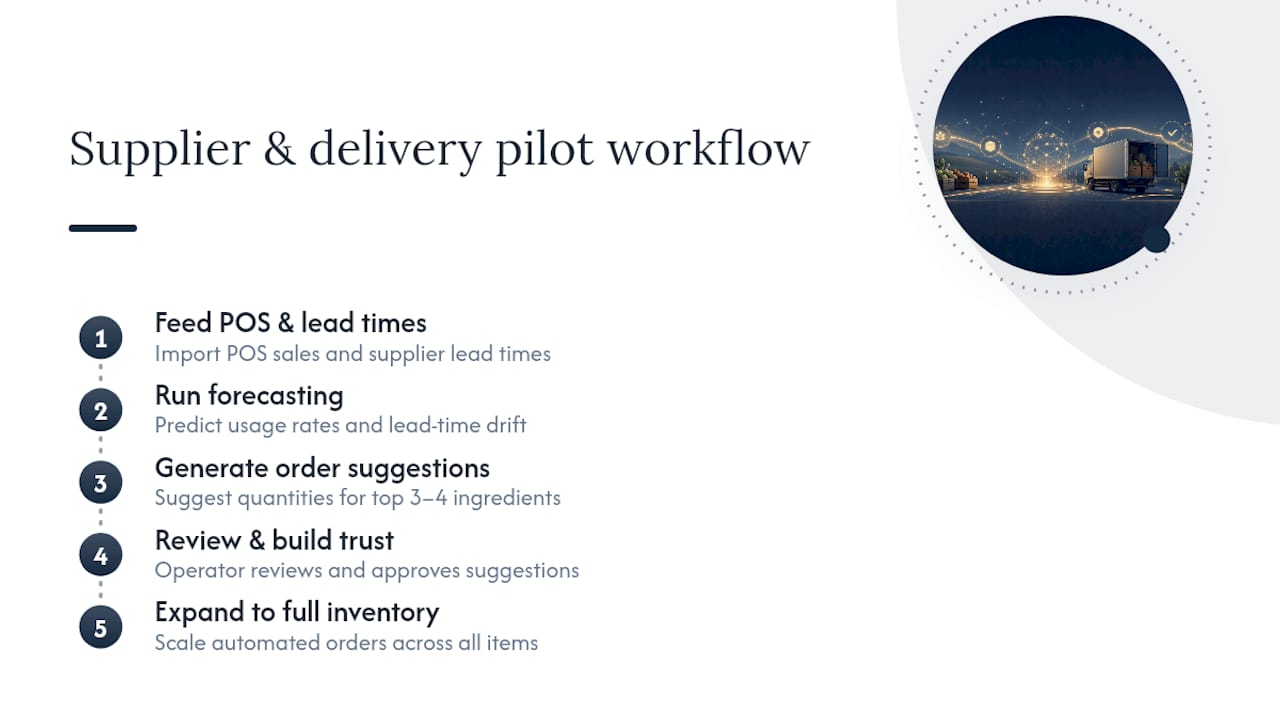
Supplier relationships are where a lot of AI value hides in plain sight, because most of that spend runs on manual purchase orders and gut-feel reorder timing. Predictive inventory tools flag when a given ingredient's usage rate is diverging from historical patterns and can auto-generate a purchase order suggestion before a stockout forces an emergency call to a backup supplier.
Delivery logistics benefit from the same predictive layer. AI models that track lead times across your supplier list can flag when a vendor's delivery reliability is slipping, which matters more than most operators realize; a supplier who's consistently a day late doesn't just delay one shipment, it cascades into prep schedule changes and last-minute substitutions that hurt consistency. US Foods points to this kind of predictive insight as a core part of how AI improves kitchen efficiency, not just customer-facing operations.
The practical entry point is smaller than it sounds. Start by feeding your POS sales data and current supplier lead times into a forecasting tool, then let it suggest order quantities for your three or four highest-volume ingredients before expanding to the full inventory list. Getting that narrow slice right builds the trust you need before handing over purchasing decisions on lower-volume items, where errors are cheaper but still add up over a quarter.
How Can AI Personalize Marketing and Customer Engagement?
Most restaurant marketing still treats every guest the same, which is exactly the gap AI closes well. Guest data from your POS and reservation system, combined with review sentiment analysis, lets you segment customers by visit frequency, average check, and even dish preference, then tailor offers instead of blasting the same discount to everyone on your list.
A guest who visits weekly and orders the same entrée doesn't need a 20% off coupon to come back. A guest who hasn't visited in three months might. AI-driven segmentation identifies that difference automatically, which protects margin on your loyal customers while still using promotional spend where it actually changes behavior.
Review analysis tools do double duty here. Beyond flagging operational issues, sentiment summaries surface what guests love about specific dishes or service moments, giving your marketing team real language to use in campaigns instead of generic copy. Chatbots and voice AI extend this into the reservation and follow-up process, sending a personalized thank-you or feedback request timed to the actual visit rather than a batch email sent days later. The result isn't flashier marketing. It's marketing that spends less to get more from guests who were already inclined to return.

Can AI Help Monitor Health and Safety Compliance?
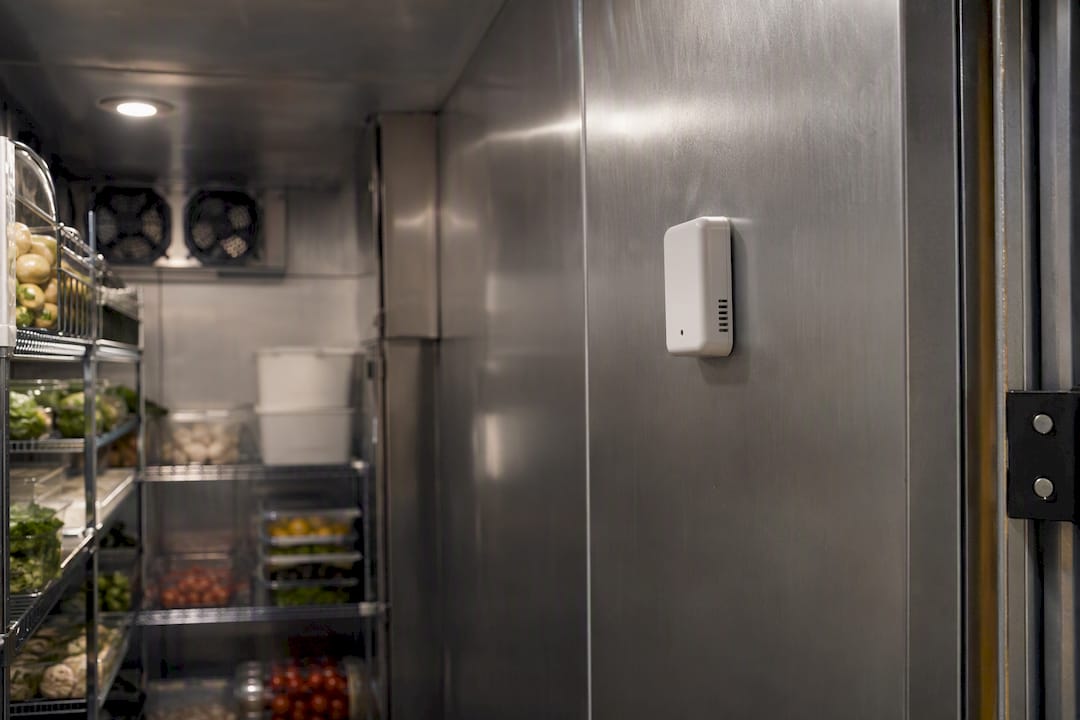
Health inspections and internal audits used to rely entirely on someone remembering to check the walk-in temperature log or the handwashing schedule. AI-connected sensors now handle a meaningful part of that burden automatically, tracking refrigeration temperatures continuously and flagging deviations the moment they happen rather than during a weekly manual check.
Computer vision tools can monitor kitchen stations for glove use and handwashing frequency, generating exception alerts when compliance drops rather than waiting for a surprise inspection to catch the gap. That shift matters operationally: a temperature excursion caught within minutes is a minor adjustment, while one discovered a day later during a manual log review can mean throwing out an entire delivery of product.
Documentation is the other half of the compliance story, and it's where AI quietly saves the most manager time. Instead of a paper log that's easy to backfill inaccurately, automated systems create a timestamped record that's actually useful during a health department visit or an internal audit. That record also builds a pattern over time, showing whether a specific piece of equipment or a specific shift consistently runs into compliance issues, which points you toward a root cause instead of a one-off write-up. For operators managing multiple locations, this kind of standardized, automated compliance tracking replaces a patchwork of paper logs with one consistent system across every site.
How Does Predictive Maintenance Prevent Kitchen Equipment Failures?
A walk-in cooler that fails at 2 a.m. on a Friday is one of the most expensive problems in a restaurant, and it's almost always preventable. Predictive maintenance tools monitor equipment performance data, like compressor cycling patterns or energy draw, and flag when a piece of equipment is trending toward failure well before it actually breaks down.
This works because most equipment failures don't happen suddenly. A refrigeration unit's compressor typically shows a gradual efficiency decline over weeks before it fails completely, and an AI model trained on that equipment's historical performance can catch the drift early enough to schedule a repair during a slow shift instead of an emergency call during Saturday dinner service.
The operational payoff shows up in two places. First, avoided downtime: a scheduled repair costs a fraction of an emergency service call, and it doesn't force you to throw out a walk-in's worth of inventory. Second, extended equipment life, since catching small issues early prevents the kind of cascading damage that shortens a unit's usable lifespan. For multi-location groups, predictive maintenance data also helps prioritize capital planning, showing which locations have equipment approaching end-of-life before it becomes an emergency replacement instead of a planned one.
Why AI Should Reduce Cognitive Load, Not Add to It
AI succeeds in a restaurant when it makes a manager's day simpler, not when it gives them one more system to check. If you're choosing a pilot, pick the one that replaces an existing manual task rather than adding a parallel process on top of it. That single filter eliminates most of the tools that look impressive in a demo but end up ignored within a month.
Wits' End Solutions has watched this pattern play out across pilots that succeeded and ones that stalled, and the difference rarely comes down to the technology itself.
— Chris
How Wits' End Solutions Supports Your AI Adoption
Wits' End Solutions is the alternative to running an AI pilot blind: instead of guessing which vendor fits your operation, our team designs the pilot, sets the baseline metrics, and aligns your SOPs before you spend a dollar on software. We've run the daily operations ourselves, so we know which recommendations a manager will actually follow and which ones get ignored by week two.
Our engagements typically start with a scoping conversation to identify your single highest-impact use case, whether that's scheduling, inventory, or guest automation, then move into pilot design and measurement through our deep analytics and advising services. If the pilot proves out, we can support SOP rollout across additional locations or step in with task force support during the transition. Ready to scope a pilot for your operation? Reach out through Wits' End Solutions to start the conversation.
Sources
- AI for Restaurants: 10 Genius Ways to Implement AI in 2026
- Choosing the right AI tools for your restaurant
- How AI is revolutionizing restaurants