
TL;DR:
- Setting up restaurant reservations involves configuring booking software, mapping your floor plan, and establishing availability rules to optimize guest flow. Proper training, testing, and regular reviews are essential to prevent errors, reduce no-shows, and maximize revenue. A well-calibrated system reflects real operations, ensuring a consistent guest experience and improved profitability.
Setting up restaurant reservations is the deliberate process of selecting booking software, mapping your floor plan, configuring availability rules, and connecting multiple booking channels to control guest flow and protect revenue. Done correctly, the restaurant booking process reduces no-shows, increases covers, and gives your front-of-house team a clear operational framework every shift. Platforms like OpenTable, Eatsy, and Google Reserve have made this setup more accessible than ever, and most independent restaurants pay between free and $150 per month for reservation software while seeing 30 to 50 percent more bookings after launch. This guide walks you through every step.
How to set up restaurant reservations: what you need first
Before you touch any software, you need three categories of information ready: your physical space, your service schedule, and your booking policies.
Your floor plan data:
- Total table count, seating capacity per table, and which tables can be combined
- Section labels (bar, patio, main dining room) and any accessibility or preference notes
- Maximum party sizes your kitchen and floor staff can actually execute well
Your service schedule:
- Meal periods with precise open and close times for reservations
- Days of the week you accept bookings versus walk-in only
- Blackout dates, private event holds, and holiday service changes
Your booking policies:
- Minimum and maximum party sizes per booking
- Deposit requirements and cancellation windows
- Whether you hold tables for late arrivals and for how long
Most reservation platforms, including OpenTable, Resy, and Eatsy, require this data during onboarding. Having it organized before you log in saves hours of back-and-forth configuration. The online booking widget itself takes under three hours to launch once your data is clean.
| Prerequisite | What to prepare |
|---|---|
| Floor plan | Table numbers, capacities, combinable pairs, sections |
| Service schedule | Meal periods, days open, blackout dates |
| Booking policies | Deposit rules, cancellation windows, party size limits |
| Digital access | Website login, Google Business Profile, social media accounts |
How do you accurately configure your floor plan and availability?
Accurate floor plan configuration is the single most consequential step in the entire setup. A misconfigured table count or wrong turn time creates double bookings, which damage guest trust faster than almost any other operational failure.

Start by mapping every table with its actual seat count, not its maximum squeeze capacity. Note which tables combine and what the combined capacity becomes. Assign each table to a section so your host team can manage seating assignments by zone, not just by availability. This level of detail allows the system to distribute covers across the floor rather than stacking everyone in one section.
Effective capacity reflects kitchen and floor execution, not fire code limits. A 60-seat dining room staffed by two servers and a two-person kitchen line should not be booked to 60 covers in a single turn. Set your bookable capacity at the number your team can execute at a high standard, then adjust upward as you hire and train.
Configure your turn times by meal period, not as a single global setting. A 75-minute turn works for a casual lunch, while a weekend dinner service may need 105 minutes. Add a 15 to 20 minute buffer between reservation slots for table turnover and a matching hold window for late arrivals before the table releases back to availability.
Pro Tip: Set your bookable capacity 10 to 15 percent below your operational maximum when you first launch. You can open more slots as your team builds confidence with the new system. Overbooking on day one is far more damaging than leaving a few covers on the table.
What steps are involved in setting up your online booking widget?
The booking widget is the customer-facing piece of your reservation system, and it needs to be placed where guests are already looking.
-
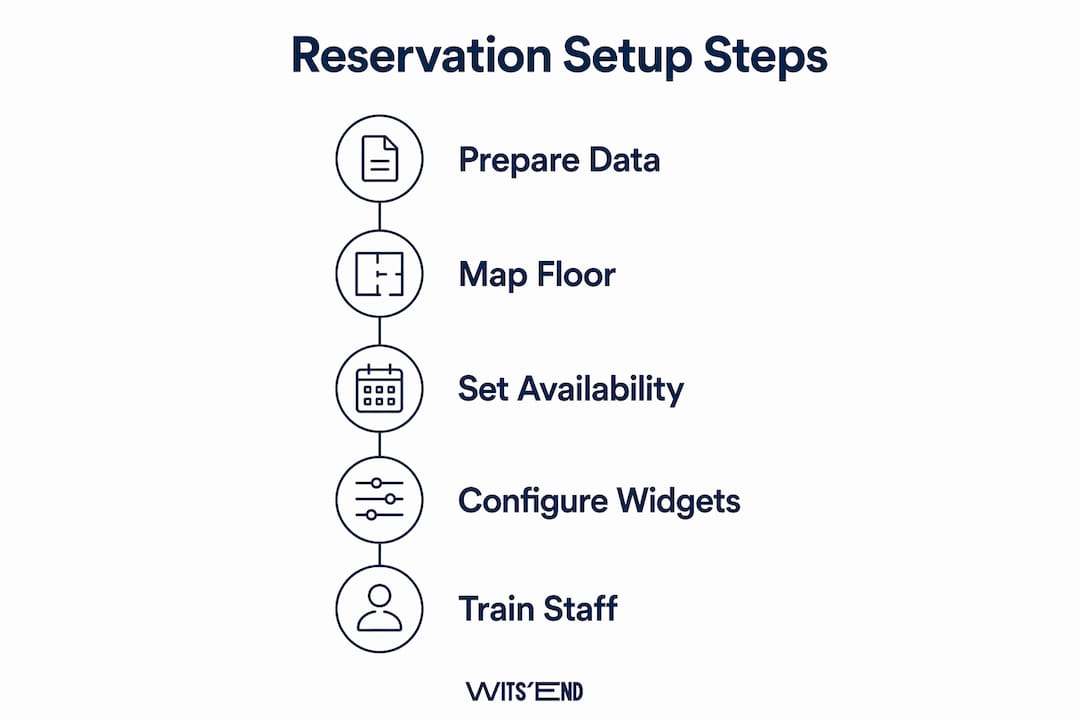
Generate your embed code. Inside your reservation platform (OpenTable, Resy, Eatsy, or similar), navigate to the widget or integration settings. Copy the embed code or booking link provided.
-
Install on your website. Place the widget or a prominent booking button on your homepage, your menu page, and your contact page. Multiple widget placements across high-visibility pages maximize reservation opportunities. If you use a CMS like Squarespace or WordPress, most platforms accept the embed code directly in a custom HTML block.
-
Optimize for mobile. The booking flow should be limited to four or five steps, and the entire experience must work cleanly on a phone screen. Most diners making a quick reservation decision are on mobile, and a slow or cluttered widget loses them immediately.
-
Connect Google Reserve and social channels. Link your reservation platform to your Google Business Profile so the "Reserve a Table" button appears directly in Google Search and Maps results. Connect Instagram and Facebook booking features through the same platform integration settings.
-
Test every booking flow end to end. Make a test reservation through your website, through Google, and through any social channel you have connected. Confirm that the guest receives an automated confirmation email and that a pre-arrival reminder fires at the correct interval. Automated confirmation and reminder messages reduce staff workload and cut no-show rates significantly.
-
Integrate phone reservations in real time. Train your host team to log phone bookings directly into the same system, not on a paper log or a separate spreadsheet. Every channel feeding into one platform is the only way to prevent double bookings.
Pro Tip: Ask a friend or family member who has never seen your website to book a reservation on their phone without any guidance. Watch where they hesitate. That friction point is your first fix.
How to train your staff and monitor your reservation system launch
A well-configured system fails quickly if your team does not know how to use it. Training is not optional, and it should happen before the system goes live, not during the first busy Friday night.
Run a dedicated training session covering the host stand workflow: how to check in arriving guests, how to seat walk-ins against live availability, how to flag a no-show, and how to manually add or modify a booking. Create a one-page quick reference guide that lives at the host stand for the first two weeks. Keep it specific to your setup, not a generic platform tutorial.
Run the new system alongside your existing method for two to three days before fully switching over. This parallel trial catches configuration errors before they affect real guests and builds staff confidence without the pressure of a hard cutover. During this window, compare what the system shows against what your team would have done manually and resolve any discrepancies.
After launch, monitor these metrics daily for the first two weeks:
- Double bookings or seating conflicts
- No-show rate versus your pre-system baseline
- Reminder delivery confirmation (email and SMS)
- Guest feedback on the booking experience
- Staff errors in manual entry or check-in procedures
Collect feedback from your host team after each shift during the first week. They will surface problems faster than any dashboard will. Adjust turn times, buffer windows, or capacity settings based on what you observe, not what the software defaults suggest. For deeper guidance on staff training techniques when introducing new systems, the principles of structured onboarding apply directly here.
What are the most common mistakes when setting up reservations?
Most configuration errors fall into a predictable set of categories, and knowing them in advance saves you from learning them the hard way.
Wrong turn times are the most frequent mistake. Operators set a single global turn time that works for their fastest table but fails on a Saturday night when guests linger. Audit your actual table times from POS data before you configure this setting.
Overbooking against kitchen capacity is the second most common issue. Centralizing reservations from web, phone, and Google into one platform prevents double entries, but it does not automatically protect you from booking more covers than your kitchen can execute. That ceiling is set by your staffing model and prep capacity, not the software.
Weak cancellation policies allow no-shows to go unchecked. Requiring a credit card deposit for parties of six or more with a 24 to 48 hour cancellation window is standard practice. Cancellations inside that window result in deposit forfeiture under most restaurant policies. Communicate this policy clearly at the point of booking, not buried in a confirmation email.
Siloed booking channels create backlog and confusion. If your host team is managing a phone log, a paper book, and an online platform simultaneously without syncing them, a double booking is a matter of when, not if. One system, all channels, updated in real time.
The goal of a reservation system is not to fill every seat. It is to fill the right seats at the right pace so your team can deliver a consistent guest experience from the first cover to the last.
Key takeaways
A well-executed restaurant reservation system setup requires accurate floor plan data, realistic capacity settings, a mobile-optimized booking widget, and a trained team operating from a single centralized platform.
| Point | Details |
|---|---|
| Prepare your data first | Gather floor plan, service schedule, and booking policies before touching any software. |
| Set realistic capacity | Book to your operational ceiling, not your fire code maximum, to protect service quality. |
| Place the widget everywhere | Install your booking button on your homepage, menu page, contact page, Google, and social channels. |
| Run a parallel trial | Operate the new system alongside your old method for two to three days to catch errors early. |
| Enforce cancellation policies | Require deposits for large parties with a 24 to 48 hour cancellation window to reduce no-shows. |
Reservations are a revenue function, not a logistics task
I have worked with enough restaurants to say this plainly: most operators treat their reservation system as a scheduling tool and miss the fact that it is one of the most direct levers they have on revenue per shift.
The restaurants that get this right are not using the most expensive software. They are the ones who have taken the time to configure their system to reflect how their floor actually operates, not how they wish it operated. They know their real turn times. They know which tables should never be booked back-to-back without a buffer. They have a cancellation policy with teeth, and their entire team enforces it without hesitation.
What I see most often is a restaurant that has done a decent job with the technical setup but skipped the operational calibration. The widget is live, the Google button works, and then the system gets blamed when service falls apart on a busy night. The system did not fail. The capacity settings were wrong, and nobody caught it because there was no parallel trial period and no post-launch review.
Reservation management is a core business function that directly impacts turnover efficiency and guest satisfaction. Treat it accordingly. Review your settings quarterly, not just at launch. When your staffing model changes, your bookable capacity should change with it. When you add a patio or close a section for a private event, that needs to be reflected in the system before the first guest tries to book, not after the conflict surfaces at the host stand.
The operators who build this habit into their daily operations are the ones who stop firefighting and start running a predictable, profitable floor.
— Chris
How Wits' End Solutions can support your reservation setup
At Wits' End Solutions, we work with restaurant owners and operators across the United States to build the operational infrastructure that makes a reservation system actually perform. That means configuring your floor plan to match your real staffing model, selecting the right platform for your concept, and training your team to use it correctly from day one. Our hospitality task force services can step into your operation and handle setup, training, and launch monitoring directly. We also offer deep analytics and advising to help you read your booking data and make decisions that improve covers, reduce no-shows, and protect your guest experience over time.
FAQ
What software do restaurants use for reservations?
The most widely used reservation platforms for independent and mid-size restaurants in the United States are OpenTable, Resy, and Eatsy. Most cost between free and $150 per month depending on cover volume and feature set.
How long does it take to set up a restaurant reservation system?
Full technical setup takes under half a day for most restaurants, with the online booking widget live in under three hours once your floor plan and policy data are ready.
How do you reduce no-shows with a reservation system?
Require a credit card deposit for parties of six or more with a 24 to 48 hour cancellation window. Automated confirmation and reminder messages also cut no-show rates by keeping the reservation top of mind for guests.
How do you connect reservations from multiple channels?
Link your reservation platform to your Google Business Profile, website, Instagram, and Facebook so all bookings feed into one system in real time. Centralizing all channels prevents double bookings and eliminates the need for manual reconciliation.
How often should you review your reservation system settings?
Review your capacity settings, turn times, and booking policies at least quarterly, and any time your staffing model or floor layout changes. Settings that worked in January may not reflect your operation in July.