
TL;DR:
- Setting up Toast Online Ordering involves activating the module, configuring menus, and assigning an Ethernet-connected autofire device within an hour. Proper preparation, including staff training, menu quality, and scheduling settings, is essential to ensure a smooth rollout and boost revenue. Optimizing online menus with high-quality photos and strategic marketing reduces third-party commissions and enhances customer loyalty.
Setting up Toast Online Ordering is the process of activating and configuring Toast's integrated online ordering system to accept direct pickup and delivery orders through your existing Toast POS infrastructure. Most restaurants complete the full setup in under an hour by enabling the module in Toast Web, configuring menus and dining options, and assigning an autofire device. This guide covers every step of that process, plus menu optimization, troubleshooting, and tactics to shift customers away from high-commission third-party apps toward your own direct ordering channel.
How to set up Toast online ordering: prerequisites first
Before you touch a single setting in Toast Web, you need the right pieces in place. Skipping this stage is the most common reason operators hit friction during rollout.
Here is what to gather before you start:
- Toast Web credentials. You need admin-level access to your Toast Web dashboard. If you are a manager without full admin rights, coordinate with your account owner before proceeding.
- Current menu structure. Decide which items, modifiers, and categories you want visible online. Not every in-house item belongs on your digital menu. Simplify where you can.
- A dedicated POS device on Ethernet. This device will serve as your autofire device, the terminal that automatically fires online orders to the kitchen. Wi-Fi connections cause persistent syncing problems, so Ethernet is non-negotiable here.
- Branding assets for Online Ordering Pro. If you are using Toast Online Ordering Pro, prepare a high-resolution logo and banner image. Accepted formats include JPG, JPEG, PNG, WEBP, and SVG, with a maximum file size of 5MB per asset.
- A staff training plan. Phased staff training before launch mitigates operational bottlenecks during system rollout. Brief your team on how online orders will appear, where they will be staged, and who owns the handoff to the guest.
Pro Tip: Run a brief pre-launch checklist with your kitchen manager. Confirm the autofire device is plugged into Ethernet, the correct menu groups are toggled on, and at least two staff members know how to handle an online order from receipt to pickup.
Step-by-step guide to configuring Toast online ordering
With your prerequisites in order, the actual configuration moves quickly. Follow these steps in sequence to avoid having to backtrack.
-
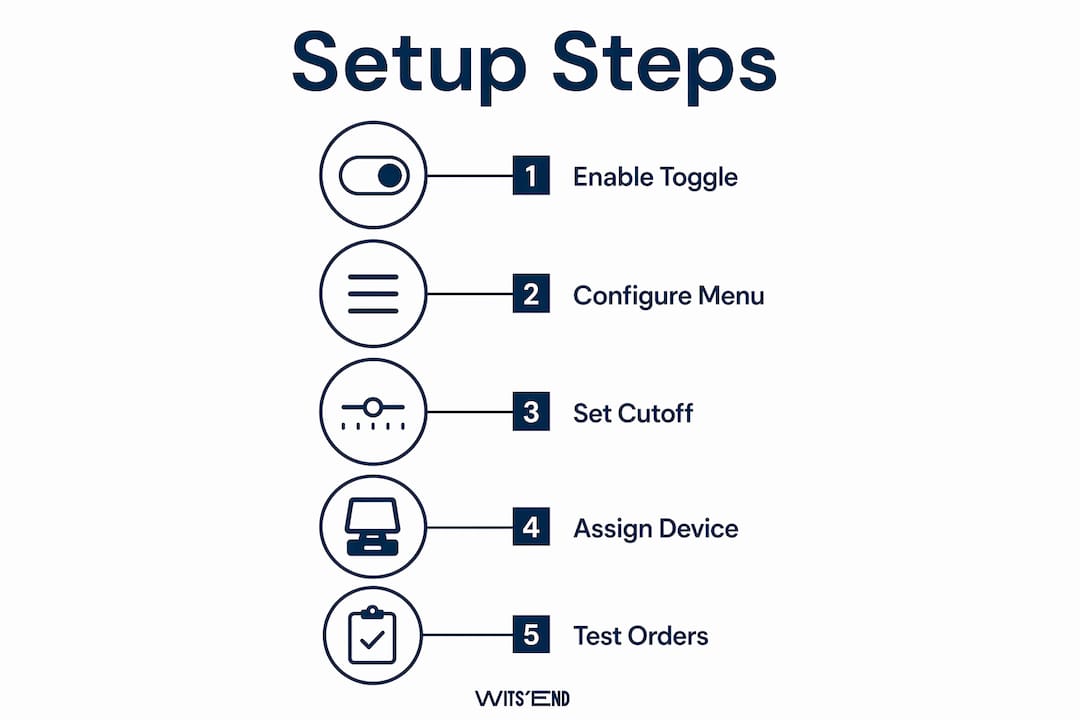
Enable the Online Ordering module. Log into Toast Web and navigate to the Takeout and Delivery section. Toggle Online Ordering to active. If you do not see this option, confirm your Toast subscription includes the Online Ordering module.
-
Configure menu visibility. Under your menu settings, select which menus, groups, and items are visible for online orders. You can create a dedicated online menu or mirror your in-house menu with adjustments. Flag items as unavailable if they do not travel well or require tableside preparation.
-
Set dining options. Define which fulfillment types you offer: pickup, delivery, curbside, or a combination. For each option, configure scheduling settings. Toast's advanced scheduling settings allow up to 14 days of future order scheduling, with customizable minimum lead times and cutoff times. This protects your kitchen from being overwhelmed by last-minute bulk orders.
-
Assign your autofire device. In your device settings, designate exactly one POS terminal as the autofire device. This is the terminal that receives and fires online orders automatically without staff intervention. Connect it via Ethernet and confirm it stays powered on during all service hours.
-
Upload branding elements. If you are on Online Ordering Pro, upload your logo and banner image in Toast Web under the Online Ordering appearance settings. This creates a branded ordering interface that reinforces your restaurant's identity.
-
Configure payment processing and delivery fees. Set accepted payment methods for online orders and define delivery fee structures. You can set flat fees, distance-based fees, or minimum order thresholds depending on your delivery model.
-
Run a full test order. Place a test order from the customer-facing URL, confirm it fires to the kitchen on the autofire device, and verify that order status notifications work correctly. Do this before going live.
Here is a quick reference for the core configuration settings:
| Setting | Location in Toast Web | Key decision |
|---|---|---|
| Online Ordering toggle | Takeout and Delivery | Enable before any other step |
| Menu visibility | Menu Management | Select groups and items for online display |
| Dining options | Takeout and Delivery | Pickup, delivery, curbside |
| Scheduling window | Advanced Settings | Up to 14 days; set lead times and cutoffs |
| Autofire device | Device Management | One device, Ethernet only |
| Branding assets | Online Ordering Pro settings | Logo and banner, max 5MB each |
Pro Tip: Set a scheduling cutoff time at least 15 minutes before your kitchen closes. This prevents orders from firing when your team is already in breakdown mode and protects food quality on the final tickets of the night.
How to optimize your Toast online ordering menu
Activating the system is only half the work. The menu you present online directly determines your average order value and how often guests return.
High-quality photos and descriptive item text increase order frequency by 30% and average order value by 8 to 12%. That is a significant revenue lift from an asset you create once and benefit from indefinitely. Most operators underinvest here, treating the online menu as a functional list rather than a sales tool.
Apply these practices when building your online menu:
- Use real photography. Smartphone photos taken in natural light outperform stock images. Guests order what they can visualize. A photo of your actual burger converts better than a generic image.
- Write descriptions that sell, not just describe. "Slow-braised short rib, roasted garlic mash, red wine jus" outperforms "beef short rib with mashed potatoes." Specificity signals quality and justifies price.
- Organize logically. Group items in a sequence that mirrors how guests think: starters, mains, sides, drinks, desserts. If you offer catering or family meals, give those a dedicated section rather than burying them in the main menu.
- Build in upsell opportunities. Use Toast's modifier groups to prompt add-ons at the item level. A prompt asking "Add a side?" or "Upgrade to a combo?" at checkout is the digital equivalent of a server's upsell. For more structured approaches, the upsell strategies that work in restaurants and bars translate directly to online modifier design.
- Manage availability in real time. If you run out of a key ingredient mid-service, toggle that item offline immediately. Guests who order an unavailable item and receive a refund or substitution rarely return.
| Menu approach | Impact on guest experience | Impact on revenue |
|---|---|---|
| No photos, plain text | Low conversion, high abandonment | Baseline |
| Photos plus descriptive text | Higher confidence, lower cart abandonment | +8 to 12% average order value |
| Photos, descriptions, and upsell modifiers | Highest conversion and add-on rate | Maximum online channel revenue |
For a deeper framework on building menus that drive both profit and guest satisfaction, the menu creation process at Wits' End Solutions covers the full methodology.
Common setup challenges and how to fix them
Even a well-prepared setup runs into friction. These are the issues operators encounter most often and how to address them.
Orders not firing to the kitchen. The autofire device is the most common failure point. Confirm it is powered on, connected via Ethernet, and designated correctly in Toast Web. A device on Wi-Fi will drop the connection intermittently and miss orders without any visible error on the customer side.
Guests cannot place orders. Check that the Online Ordering toggle is active and that your scheduling timeframes cover the current time. If your cutoff time has passed or your hours are not configured correctly, the ordering page will appear closed even when your restaurant is open.
Order mix-ups at pickup. A designated packaging station near the kitchen pass prevents cold food and mismatched orders. Label every bag with the order name and number. Without a physical staging area, online orders compete with dine-in plates for counter space and errors multiply.
High commission costs from third-party apps. Consolidating marketplace orders into Toast POS reduces operational complexity and customer attrition. Beyond consolidation, a simple tactic works: place a physical card in every takeout bag with your direct ordering URL. Research shows this approach can shift 15 to 30% of marketplace customers to commission-free direct ordering within 90 days. The cost is a printed card. The return is a permanent reduction in fees.
The operators who get the most from Toast Online Ordering treat the direct channel as a marketing asset, not just a convenience feature. Every order placed directly is a customer relationship you own.
Key takeaways
A properly configured Toast Online Ordering setup requires an Ethernet-connected autofire device, a curated online menu with photos and descriptions, and a direct marketing strategy to reduce third-party commission dependency.
| Point | Details |
|---|---|
| Autofire device is critical | Assign exactly one Ethernet-connected POS terminal to avoid missed or misfired orders. |
| Menu quality drives revenue | Photos and descriptive text increase average order value by 8 to 12% and order frequency by 30%. |
| Scheduling settings protect the kitchen | Use cutoff times and lead times to prevent last-minute order surges during peak service. |
| Direct ordering reduces costs | Simple in-bag marketing cards can shift 15 to 30% of marketplace customers to your commission-free channel within 90 days. |
| Staff training prevents launch failures | Brief your team on order flow, staging, and handoff before going live, not after. |
What I've learned from Toast online ordering rollouts
The autofire device configuration is where most operators lose an hour they did not plan to lose. I have seen kitchens go live with the device on Wi-Fi because it was the closest terminal to the pass, and then spend the first service troubleshooting missed orders while guests called to ask where their food was. Run the Ethernet cable. It is not glamorous, but it is the single most reliable thing you can do before launch.
On the menu side, the gap between operators who treat online photos as optional and those who invest a single afternoon in proper shots is measurable in dollars. The guest experience online starts with the menu. If the photos look like an afterthought, the guest assumes the food might be too.
The third-party commission conversation is where I push back hardest with clients. Platforms like DoorDash and Uber Eats are useful for discovery, but they are expensive retention tools. A printed card in a bag costs almost nothing. Shifting even 20% of those orders to your direct Toast channel over three months has a real impact on your P&L. Most operators know this and still do not act on it. Start with one bag insert and measure the result.
Phased training matters more than most managers expect. Walking your team through the order flow on a quiet Tuesday afternoon is worth more than a rushed briefing on launch day. The staff who understand the system are the ones who catch errors before they reach the guest.
— Chris
How Wits' End Solutions supports your online ordering setup
Setting up the technology is one part of the equation. Building a brand and operation that converts online visitors into loyal regulars is another. At Wits' End Solutions, we work with restaurant operators across the U.S. on brand development, team training, and the operational frameworks that make digital ordering channels perform at their best. Whether you need help designing a menu that sells, training a team to handle online order volume, or building the analytics infrastructure to track what is working, we bring direct hospitality experience to every engagement. Reach out for a consultation and we will tell you exactly where your setup has room to grow.
FAQ
How long does Toast online ordering setup take?
Most restaurants complete the full setup in under an hour by enabling the module in Toast Web, configuring menus and dining options, and assigning an autofire device.
What is an autofire device in Toast?
An autofire device is a single designated POS terminal that automatically receives and fires online orders to the kitchen without staff input. It must be connected via Ethernet for reliable performance.
Can I schedule future orders with Toast online ordering?
Yes. Toast's advanced scheduling settings support up to 14 days of future order scheduling, with configurable minimum lead times and cutoff times to protect kitchen capacity.
Do I need Online Ordering Pro to accept online orders?
No. Standard Toast Online Ordering handles pickup and delivery without Pro. Online Ordering Pro adds a branded customer interface and requires logo and banner assets up to 5MB in accepted formats.
How do I reduce third-party delivery commissions using Toast?
Place a direct ordering URL on physical cards inside every takeout bag. This tactic shifts 15 to 30% of marketplace customers to your commission-free Toast direct ordering channel within 90 days.